Breaking News
Loading...
  • New Movies
  • Recent Games
  • Tech Review

Tab 1 Top Area

Tech News

Game Reviews

Recent Post

Showing posts with label Ice Cold Apps. Show all posts
Saturday, November 22, 2014
Sunday, April 6, 2014
Thursday, February 13, 2014
Screenshot Ultimate Pro v2.9.24

Screenshot Ultimate Pro v2.9.24

Screenshot Ultimate Pro v2.9.24

Paid Application Added Date: November 26 2014
Requires Android: 2.1 and upDeveloper: Ice Cold Apps
Size: 2.1MCategory: Tools
Version: 2.9.24Version history: Screenshot Ultimate Pro

Screenshot Screenshot Ultimate Pro v2.9.24

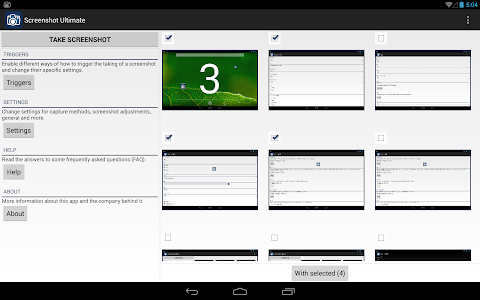
"Now you can take a snapshot easily on your Android device (no root required: read the faq how). Take screenshots on your tablet phone or other Android device without ads! Share draw add text to a screenshot or even send/edit multiple screenshots! ★Most complete screenshot app!★ Why is Screenshot Ultimate Pro the perfect screen capture app? Well it has the most features and supports over 16 different capture methods. If this app can’t take a screenshot no other screenshot app will! We support rooted and non-rooted devices; however if you have a non-rooted phone you might have to run a small app on your computer to enable screen shooting functionality. Read the FAQ for more information. Note If you can’t get the app to work please email us and don’t post it in the reviews since we can’t respond to reviews. Thanks. Trigger methods - Overlay icon which is visible on top of all screens - Shake - Service icon click - Audio - Power (dis)connect - Folder listener - Webserver - Camera hardware button - Long click search hardware button - Custom shortcut - Widget button - Button inside the app - Intent (Tasker / Locale support) - Interval - Cronjob - Light - Proximity For every trigger separately you can set: do after vibrate sound toast timeout countdown and more! Features - No ads! - Edit taken screenshot: draw add text crop add information (android version wifi ip date/time etc) rotate mirror switch colors overlay an image use your own editor effects (sepia grayscale etc) - Share taken screenshot: apps (Email Picasa Memo etc) or upload to Imgur Glowfoto ImageShack POST to server TwitPic Tumblr - View all taken screenshots and select multiple for sending create zip edit and more! - Automatically apply "Screenshot Adjustments" to every taken screenshot - Multiple capture methods (over 16) with an auto detect option so you can select the best option - Set default save folder and filename and image format (PNG or JPEG) - Tablet support! - Set optional custom shutter sound - More! FAQ What can I do with the “Folder listener” trigger? If your device has built-in screenshot capability you can set the app to listen for changes to a folder. As soon as an image is created in that folder Screenshot Ultimate Pro will also trigger (for editing saving to your own folder etc). You could also use another screenshot app like Screenshot UX Screenshot Free Screenshot Easy Screenshot and Draw Screenshot ER Screenshot HD or Screenshot It and use Screenshot Ultimate Pro to handle the editing and saving. No “Capture Method” is available for my device! This is normal if your device isn"t rooted. It"s the way how the Android security model works; it just doesn"t allow taking a screenshot on some devices. However you can enable screenshot functionality on your device by enabling it through a computer. To see how you can do this go to “Screenshot Ultimate Pro” -“Settings” -“Capture methods” -“No capture method help”. You can email the manual to yourself so you can complete it on your computer (Windows Linux or Mac OSX). How to... Contact us by email and we’ll try to help you. Just remember if you post it in the review we can’t respond and help you so please contact us by email. Visit us on: http://www.icecoldapps.com/ Follow us on Twitter: https://twitter.com/IceColdApps Like us on Facebook: http://www.facebook.com/IceColdApps What are the permissions for? - INTERNET: the uploading to Imgur - RECORD_AUDIO: for the audio trigger (blow in the microphone to take a screenshot) - SYSTEM_ALERT_WINDOW: for the overlay icon (click it to take a screenshot) - RECEIVE_BOOT_COMPLETED: optionally auto start the app on boot - WRITE_EXTERNAL_STORAGE: save the screenshots - VIBRATE: alert when a screenshot was taken - WAKE_LOCK: optionally set your device to stay awake when the screenshot app is running - CHECK_LICENSE: check whether you bought the app"

Download APK From Server 01Download APK From Server 02
Get it on Google Play
Saturday, December 28, 2013
Screenshot Ultimate Pro v2.9.18

Screenshot Ultimate Pro v2.9.18

Screenshot Ultimate Pro v2.9.18

Paid Application Added Date: October 17 2014
Requires Android: 2.1 and upDeveloper: Ice Cold Apps
Size: 2.1MCategory: Tools
Version: 2.9.18Version history: Screenshot Ultimate Pro

Screenshot Screenshot Ultimate Pro v2.9.18

"Now you can take a snapshot easily on your Android device (no root required: read the faq how). Take screenshots on your tablet phone or other Android device without ads! Share draw add text to a screenshot or even send/edit multiple screenshots! ★Most complete screenshot app!★ Why is Screenshot Ultimate Pro the perfect screen capture app? Well it has the most features and supports over 16 different capture methods. If this app can’t take a screenshot no other screenshot app will! We support rooted and non-rooted devices; however if you have a non-rooted phone you might have to run a small app on your computer to enable screen shooting functionality. Read the FAQ for more information. Note If you can’t get the app to work please email us and don’t post it in the reviews since we can’t respond to reviews. Thanks. Trigger methods - Overlay icon which is visible on top of all screens - Shake - Service icon click - Audio - Power (dis)connect - Folder listener - Webserver - Camera hardware button - Long click search hardware button - Custom shortcut - Widget button - Button inside the app - Intent (Tasker / Locale support) - Interval - Cronjob - Light - Proximity For every trigger separately you can set: do after vibrate sound toast timeout countdown and more! Features - No ads! - Edit taken screenshot: draw add text crop add information (android version wifi ip date/time etc) rotate mirror switch colors overlay an image use your own editor effects (sepia grayscale etc) - Share taken screenshot: apps (Email Picasa Memo etc) or upload to Imgur Glowfoto ImageShack POST to server TwitPic Tumblr - View all taken screenshots and select multiple for sending create zip edit and more! - Automatically apply "Screenshot Adjustments" to every taken screenshot - Multiple capture methods (over 16) with an auto detect option so you can select the best option - Set default save folder and filename and image format (PNG or JPEG) - Tablet support! - Set optional custom shutter sound - More! FAQ What can I do with the “Folder listener” trigger? If your device has built-in screenshot capability you can set the app to listen for changes to a folder. As soon as an image is created in that folder Screenshot Ultimate Pro will also trigger (for editing saving to your own folder etc). You could also use another screenshot app like Screenshot UX Screenshot Free Screenshot Easy Screenshot and Draw Screenshot ER Screenshot HD or Screenshot It and use Screenshot Ultimate Pro to handle the editing and saving. No “Capture Method” is available for my device! This is normal if your device isn"t rooted. It"s the way how the Android security model works; it just doesn"t allow taking a screenshot on some devices. However you can enable screenshot functionality on your device by enabling it through a computer. To see how you can do this go to “Screenshot Ultimate Pro” -“Settings” -“Capture methods” -“No capture method help”. You can email the manual to yourself so you can complete it on your computer (Windows Linux or Mac OSX). How to... Contact us by email and we’ll try to help you. Just remember if you post it in the review we can’t respond and help you so please contact us by email. Visit us on: http://www.icecoldapps.com/ Follow us on Twitter: https://twitter.com/IceColdApps Like us on Facebook: http://www.facebook.com/IceColdApps What are the permissions for? - INTERNET: the uploading to Imgur - RECORD_AUDIO: for the audio trigger (blow in the microphone to take a screenshot) - SYSTEM_ALERT_WINDOW: for the overlay icon (click it to take a screenshot) - RECEIVE_BOOT_COMPLETED: optionally auto start the app on boot - WRITE_EXTERNAL_STORAGE: save the screenshots - VIBRATE: alert when a screenshot was taken - WAKE_LOCK: optionally set your device to stay awake when the screenshot app is running - CHECK_LICENSE: check whether you bought the app"

Download APK From Server 01Download APK From Server 02
Get it on Google Play
Wednesday, November 6, 2013
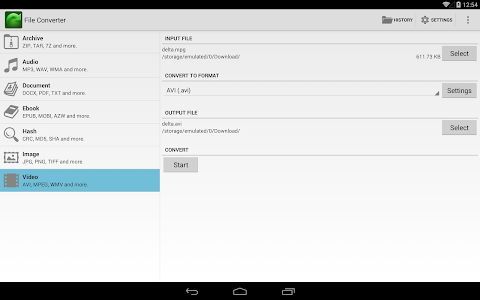
File Converter v5.0.8

File Converter v5.0.8

File Converter v5.0.8

Paid Application Added Date: September 11 2014
Requires Android: 2.1 and upDeveloper: Ice Cold Apps
Size: 2.9MCategory: Tools
Version: 5.0.8Version history: File Converter

Screenshot File Converter v5.0.8

"★★Top 400 Tools app in over 43 countries!★★ Convert to Audio Video Document Ebook Image Archive or Hash file formats from nearly all file types. Select a file and start converting it"s that easy! ★★Most features compared to other converter apps!★★ The app converts files in the cloud so your battery isn"t wasted you can continue using your device and conversions are much faster! ★★Your files are handled securely!★★ Convert to • Videos converter: convert to 3G2 3GP AVI FLV Matroska MKV Quicktime MOV MP4 MPEG-1 MPEG-2 MPG OGG WebM VP8 WMV Android BlackBerry iPad iPhone iPod Nintendo DS DPG Nintendo 3DS Playstation 3 PS3 PSP For Nintendo WII XBOX 360 • Documents converter: convert to Word (doc / docx) Flash HTML Open-Office ODT PDF RTF Text • Audio converter: convert to AAC AIFF FLAC M4A MP3 OGG OPUS WAV WMA • Ebooks converter: convert to ePub AZW3 FB2 LIT LRF MOBI PDB PDF TCR • Images converter: convert to BMP EPS GIF HDR / EXR ICO JPEG PNG SVG TGA TIFF WBMP WEBP • Hash converter: convert to Adler32 Blowfish CRC-32 CRC-32B Gost Haval-128 htpasswd Apache MD4 MD5 RIPEMD-128 RIEMD-160 SHA-1 SHA-256 SHA-384 SHA-512 Snefru Tiger-128 Tiger-160 Tiger-192 Whirlpool • Archives converter: convert to 7Z TAR BZ2 TAR GZ ZIP Extra features • Copy music from video to audio files • Convert Word to PDF • Use text recognition to convert images to PDF or TXT • Over 200 source formats are supported • For video conversion: change the quality frame rate rotate trim • For audio conversion: change the bitrate channels normalize trim • For ebook conversion: change the e-book title author encoding select the ebook type: Kindle Kindle DX Kindle Fire Apple iPad Galaxy Sony Sony 300 Sony 900 MS Reader Mobipocket Hanlin V3 Hanlin V5 Cybook 3 Cybook Opus iLiad IrexDR1000 IrexDR800 jetBook Kobo Nook Nook color Bambook Tablet Generic e-ink Generic e-ink large Pocketbook 900 • For image conversion: change the quality size filters color effects Notes • We cannot convert password protected files like a secured PDF/ZIP DRM protected files like bought ebooks/music and files bigger than 100 MB. • Your files are uploaded/downloaded securely and will be deleted immediately after the conversion completed or failed. We don"t keep copies or logs. Keywords The File Converter Ebook converter Image converter Video converter Document converter Music converter Audio converter Convert to PDF WAV to MP3 WMA to MP3 AVI to MP4 Visit File Converter on: http://www.fileconverteronline.com/ Visit us on: http://www.icecoldapps.com/ Follow us on Twitter: https://twitter.com/IceColdApps Like us on Facebook: http://www.facebook.com/IceColdApps What are the permissions for? - INTERNET: uploading and downloading from the cloud - CAMERA: take an image/video to convert - READ_PHONE_STATE: to get a unique id to handle conversions with"

Download APK From Server 01Download APK From Server 02
Get it on Google Play
Copyright © 2012 Android Stock APK All Right Reserved
Designed by CBTblogger